
#11 C++ friend와 연산자 중복
1. C++에서의 friend
1.1 friend함수
- 클래스의 멤버 함수가 아닌 외부 함수
- 전역 함수, 다른 클래스의 멤버 함수
friend키워드로 클래스 내에 선언된 함수: friend 함수라고 부름- 클래스 정의 안쪽에
friend키워드를 쓰고 함수의 선언을 적어 줌 - 클래스의 모든 멤버를 접근할 수 있는 권한 부여
- 클래스 정의 안쪽에
1.2 friend 선언의 필요성
- 클래스의
멤버로 선언하기에는 무리가 있고,클래스의 모든 멤버를 자유롭게 접근할 수있는 일부 외부 함수 작성 시
| 항목 | 세상의 친구 | 프렌드 함수 |
|---|---|---|
| 존재 | 가족이 아닌, 외부인 | 클래스 외부에 작성된 함수. 멤버가 아님 |
| 자격 | 가족의 구성원으로 인정받음. 가족의 모든 살림살이에 접근 가능 | 클래스의 멤버 자격 부여. 클래스의 모든 멤버에 대해 접근 가능 |
| 선언 | 친구라고 소개 | 클래스 내에 friend 키워드로 선언 |
| 개수 | 친구의 명수에 제한 없음 | 프렌드 함수 개수에 제한 없음 |
2. friend로 초대되는 3가지 유형
- 전역 함수: 클래스 외부에 선언된 전역 함수
- 다른 클래스의 멤버 함수: 다른 클래스의 특정 멤버 함수
- 다른 클래스 전체: 다른 클래스의 모든 멤버 함수
2.1 friend 선언 3종류
1) 외부 함수 equals()를 Rect 클래스에 friend로 선언
class Rect { // Rect 클래스 선언
    ...
    friend bool equals(Rect r, Rect s);
};
2) RectManager 클래스의 equals() 멤버 함수를 Rect 클래스에 friend로 선언
class Rect {
    ..........
    friend bool RectManager::equals(Rect r, Rect s);
};
3) RectManager 클래스의 모든 멤버 함수를 Rect 클래스에 friend로 선언
class Rect {
    ..........
    friend RectManager;
};
2.2 전역함수를 friend로 선언하는 케이스
- Rect 클래스의 equals 함수는 멤버 함수로 정의되었기 때문에, 클래스 내부에서 private 멤버인 width와 height에 직접 접근할 수 있다.
// Rect 클래스 정의
class Rect {
    int width, height; // 사각형의 폭과 높이를 나타내는 private 멤버 변수
    public:
        // 생성자: Rect 객체를 초기화 (폭과 높이를 전달받아 설정)
        Rect(int width, int height){
            this->width = width; // 멤버 변수 width 초기화
            this->height = height; // 멤버 변수 height 초기화
        }
        // equals 멤버 함수: 두 Rect 객체의 폭과 높이가 같은지 비교
        bool equals(Rect r);
};

// equals 함수의 구현부
// 입력으로 받은 Rect 객체(r)와 현재 객체(this)의 폭과 높이를 비교
bool Rect::equals(Rect r){
    if(this->width == r.width && this->height == r.height) // 두 사각형의 폭과 높이 비교
        return true; // 같으면 true 반환
    else
        return false; // 다르면 false 반환
}

int main(void) {
    Rect a(3,4), b(4,5); // Rect 객체 a와 b 생성, 각각 폭과 높이를 (3,4), (4,5)로 초기화
    if(a.equals(b)) // a와 b가 같은지 비교 (폭과 높이 모두 동일한지 확인)
        cout << "height는 equal" << endl; // 같으면 출력
    else
        cout << "not equal" << endl; // 다르면 출력

    return 0; // 프로그램 종료
}
-
클래스 외부에 정의된 전역함수를 friend 선언함으로서 private멤버변수에 접근 가능
class Rect2{
    int width, height;
    public:
        Rect2(int width, int height){
            this -> width = width; this -> height = height;
        }
    friend bool equals(Rect2 a, Rect2 b); //friend 선언함으로서 private멤버변수에 접근 가능
};

//클래스 외부에 정의된 전역함수
bool equals(Rect2 a, Rect2 b){
    //width,heitht는  private이기 때문에 접근 불가
    if(a.width ==b.width && a.height == b.height)
        return true;
    else
        return false;
}

int main()
{
    Rect2 a(2,3), b(3,4);
    if(equals(a,b))
        cout<<"equal"<<endl;
    else
        cout<<"not equal"<<endl;

    return 0;
}
2.3 다른 클래스의 멤버함수를 friend로 선언
#include <iostream>
using namespace std;

class Rect;

class RectManager {
public:
    bool equals(Rect r, Rect s);
};

class Rect {
    int width, height; // 사각형의 폭과 높이를 나타내는 private 멤버 변수
public:
    // 생성자: Rect 객체를 초기화 (폭과 높이를 전달받아 설정)
    Rect(int width, int height) {
        this->width = width; // 멤버 변수 width 초기화
        this->height = height; // 멤버 변수 height 초기화
    }
    **********************************************************************
    // RectManager 클래스의 equals 멤버를 friend로 선언
    // RectManager의 equals 함수가 Rect의 private 멤버에 접근 가능하도록 허용
    friend bool RectManager::equals(Rect r, Rect s);
    **********************************************************************

};
    **********************************************************************
// RectManager클래스의 equals 함수 구현
// Rect 클래스의 private 멤버 (width, height)에 접근 가능 (friend 선언 덕분)
bool RectManager::equals(Rect r, Rect s) {
    if (r.width == s.width && r.height == s.height) // 폭과 높이를 비교
        return true; // 같으면 true 반환
    else
        return false; // 다르면 false 반환
}
    **********************************************************************

int main() {
    Rect a(3, 4), b(3, 4); // Rect 객체 a와 b 생성, 동일한 크기
    RectManager man; // RectManager 객체 생성

    // RectManager의 equals 함수로 a와 b 비교
    if (man.equals(a, b))
        cout << "equal" << endl; // 같으면 출력
    else
        cout << "not equal" << endl; // 다르면 출력

    return 0;
}
2.4 다른 클래스 전체를 friend로 선언
#include <iostream>
using namespace std;

class Rect;

class RectManager {
public:
    bool equals(Rect r, Rect s);
    void copy(Rect& dest, Rect& src);
};

class Rect {
    int width, height;
public:
    // 생성자: Rect 객체를 초기화
    Rect(int width, int height) {
        this->width = width;
        this->height = height;
    }
    **********************************************************************

    // RectManager 클래스 전체를 friend로 선언
    // RectManager 클래스 내의 모든 함수가 Rect의 private 멤버에 접근 가능
    friend RectManager;
    **********************************************************************

};

// RectManager의 equals 함수 구현
// Rect 클래스의 private 멤버 (width, height)에 접근 가능
bool RectManager::equals(Rect r, Rect s) {
    if (r.width == s.width && r.height == s.height)
        return true; // 같으면 true 반환
    else
        return false; // 다르면 false 반환
}

// src 객체의 폭과 높이를 dest 객체로 복사
void RectManager::copy(Rect& dest, Rect& src) {
    dest.width = src.width; // src의 폭을 dest로 복사
    dest.height = src.height; // src의 높이를 dest로 복사
}

int main() {
    Rect a(3, 4), b(5, 6); // Rect 객체 a와 b 생성
    RectManager man; // RectManager 객체 생성

    man.copy(b, a);
    if (man.equals(a, b))
        cout << "equal" << endl;
    else
        cout << "not equal" << endl;

    return 0;
}
3. 연산자 중복
3.1 연산자 중복이란?
연산자 중복은 C++ 언어에서 제공하는 기능으로, 기존에 정의된 연산자(+, -, *, == 등)에 새로운 의미를 부여하여 사용자 정의 객체에서도 사용할 수 있도록 하는 것을 말한다.
3.2 연산자 중복의 사례: +연산자에 대해
3.2.1 정수 더하기
int a=2, b=3, c;
c = a + b; // + 결과 5. 정수가 피연산자일 때 2와 3을 더하기
3.2.2 문자열 합치기
string a="C", c;
c = a + "++"; // + 결과 "C++". 문자열이 피연산자일 때 두 개의 문자열 합치기
3.2.3 색 섞기
Color a(BLUE), b(RED), c;
c = a + b; // c = VIOLET. a, b의 두 색을 섞은 새로운 Color 객체 c
3.2.4 배열 합치기
SortedArray a(2,5,9), b(3,7,10), c;
c = a + b; // c = {2,3,5,7,9,10}. 정렬된 두 배열을 결합(merge) 새로운 배열 생성
3.3 연산자 중복의 특징
3.3.1 C++에 본래 있는 연산자만 중복 가능
C++에서 이미 정의된 연산자만 중복이 가능.
예를 들어:
+, -, *, ==같은 연산자는 중복 가능.- 그런데
#,@같은 C++에 없는 연산자는 중복 불가능.
3.3.2 연산자를 함수로 구현 (⇒ 연산자 함수)
연산자 중복은 함수 형태로 구현할 수 있다. 이 함수는 클래스 내부 또는 외부에서 정의할 수 있다.
예시: 복소수 + 연산자 중복
class Complex {
    int real, imag; // 복소수의 실수부와 허수부
public:
    Complex(int r, int i) : real(r), imag(i) {}

    // + 연산자 중복
    Complex operator+(const Complex& other) {
        return Complex(real + other.real, imag + other.imag);
    }
};
3.3.3 피연산자의 개수를 바꿀 수 없음
연산자의 피연산자 개수(항의 개수)는 변경할 수 없다.
- 단항 연산자: 피연산자가 1개이다. 예:
x - 이항 연산자: 피연산자가 2개이다. 예:
a + b
예를 들어, + 연산자는 항상 두 개의 항에 적용되기 때문에, 이를 세 개나 한 개로 바꿀 수는 없다.
3.3.4 연산 우선순위는 변경할 수 없음
연산자 중복을 사용하더라도 연산 우선순위는 변경되지 않는다.
예를 들어:
*연산자는 항상 + 연산자보다 우선순위가 높다.+연산자를 중복 정의해도, 여전히*보다 우선순위가 낮다.
3.3.5 중복 불가능한 연산자
C++에서 일부 연산자는 중복이 불가능하다. 이는 C++ 표준에서 명시적으로 제한되어 있다.
::(범위 지정 연산자): 클래스나 네임스페이스를 지정할 때 사용된다..*(멤버 포인터 연산자): 멤버 포인터에 접근할 때 사용된다.?:(삼항 연산자): 조건부 연산자로 중복할 수 없다.
3.3.6 중복 가능한 연산자
C++에서 중복 가능한 연산자는 거의 대부분이다. 다음은 중복 가능한 연산자의 예이다.
- 산술 연산자:
+,-,*,/,% - 비교 연산자:
<,>,==,!= - 논리 연산자:
&&,||,! - 기타 연산자:
[],(),new,delete
이 연산자들은 중복을 통해 클래스에서 새로운 의미를 부여할 수 있다.
3.4 연산자 함수 구현***(여기서부터 본론)
3.4.1 연산자함수 구현 방법은 총 2가지 (중요**)
- 클래스의
멤버 함수로 구현 외부 함수로 구현하고 클래스에 friend 함수로 선언
3.4.2 연산자 함수 형식
 		리턴타입 operator연산자(매개변수리스트);

		//example:
    // + 연산자 함수 형식
    Number operator+(const Number& other) {
        return Number(value + other.value); // 두 Number 객체의 값을 더해서 새로운 객체 반환
    }
내부 동작
위 코드에서 a + b는 컴파일러가 다음과 같이 해석한다:
complex c = a.operator+(b);
a: 왼쪽 피연산자,this포인터로 전달.b: 오른쪽 피연산자, 함수의 매개변수input으로 전달.
즉, 컴파일러에서만 a + b를 a.operator+(b)로 변환하여 동작한다.
3.4.3 예제: 복소수 클래스에서 + 연산자 중복
1. + 연산자 없이 구현
class Complex {
    int real, imag;
public:
    Complex(int r, int i) : real(r), imag(i) {}

    // 복소수 더하기를 멤버 함수로 구현
    Complex add(const Complex& other) {
        return Complex(real + other.real, imag + other.imag);
    }
};

int main() {
    Complex c1(1, 2), c2(3, 4);
    Complex c3 = c1.add(c2); // add()로 두 복소수를 더함
}
이 방식도 가능하지만, + 연산을 사용할 수 없고 코드가 덜 직관적이다.
2. + 연산자 중복 사용
class Complex {
    int real, imag;
public:
    Complex(int r, int i) : real(r), imag(i) {}

    // + 연산자 오버로딩
    //operator+ 함수가 호출되어 c1과 c2의 real과 imag를 더한
    //새로운 객체를 반환한다.
    Complex operator+(const Complex& other) {
        return Complex(real + other.real, imag + other.imag);
    }
};

int main() {
    Complex c1(1, 2), c2(3, 4);


    //c1 + c2는 내부적으로 c1.operator+(c2)로 변환된다. (1)
    Complex c3 = c1 + c2; // + 연산자로 두 복소수를 더함
}
+ 연산자 중복의 장점
- 코드 가독성 향상
c1 + c2는c1.add(c2)보다 직관적이다.
- 일관된 사용 경험 제공
- 숫자나 문자열처럼 사용자 정의 클래스에서도
+를 사용할 수 있다.
- 숫자나 문자열처럼 사용자 정의 클래스에서도
3.5 연산자 함수 단계별 작성해보기***
3.5.1 사용할 클래스
class Power { // 에너지를 표현하는 파워 클래스
	int kick; // 발로 차는 힘
	int punch; // 주먹으로 치는 힘
public:
	Power(int kick=0, int punch=0) //kick과 punch 값을 매개변수로 받아
	//초기화하는 생성자


	this→kick = kick; // 전달받은 kick 값을 멤버 변수 kick에 저장
	this→punch = punch; // 전달받은 punch 값을 멤버 변수 punch에 저장
}
}
3.5.2 멤버 함수로 이항 연산자 중복 구현1: + 연산자 중복
class Power {
    int kick;
    int punch;

public:
    ...
    Power operator+(Power op2); // 리턴 타입과 연산자 함수 선언
};

c = a + b; // 컴파일러에 의해 변환
(컴파일러에 의해 변환) ---->c = a.operator+(b); // 오른쪽 피연산자 b가 op2에 전달됨
3.5.3 + 연산자 함수 코드 작성
Power Power::operator+(Power op2) {
    Power tmp;                    // 임시 객체 생성
    tmp.kick = this->kick + op2.kick;   // kick 더하기
    tmp.punch = this->punch + op2.punch; // punch 더하기
    return tmp;                   // 더한 결과 리턴
}
3.5.4 +연산자 예시코드 최종 ***
#include <iostream>
using namespace std;

class Power {
    int kick;
    int punch;

public:
    Power(int kick=0, int punch=0) {
        this->kick = kick;
        this->punch = punch;
    }
    void show();
    Power operator+(Power op2); // + 연산자 함수 선언
};

void Power::show() {
    cout << "kick=" << kick << ", punch=" << punch << endl;
}

//여기서 op2는 두번째 피연산자를 뜻한다.
Power Power::operator+(Power op2) { // + 연산자 멤버 함수 구현
    Power tmp;                     // 임시 객체 생성
    tmp.kick = this->kick + op2.kick;   // kick 더하기
    tmp.punch = this->punch + op2.punch; // punch 더하기
    return tmp;                   // 더한 결과 리턴
}

int main() {
    Power a(3,5), b(4,6), c;      // Power 객체 생성
    c = a + b;                    // 파워 객체 + 연산

    a.show();                     // 객체 a 출력
    b.show();                     // 객체 b 출력
    c.show();                     // 객체 c 출력

    return 0;
}
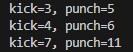
3.6 연산자 중복 코드 실습***
- kick 과 punch는 Power객체의 두가지 측면
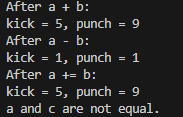
- a + b는 두 객체의 kick 값과 punch 값을 각각 더한 새로운 객체 c를 생성한다. c.kick = a.kick + b.kick = 3 + 2 = 5 c.punch = a.punch + b.punch = 5 + 4 = 9
3.6.1 연산자 오버로딩
/* 연산자 중복 */
class Power
{
    int kick;
    int punch;

public:
    // 생성자 정의
    Power(int kick = 0, int punch = 0)
    {
        this->kick = kick;
        this->punch = punch;
    }

    // + 연산자 오버로딩
    Power operator+(Power input)
    {
        Power tmp;
        tmp.kick = this->kick + input.kick;
        tmp.punch = this->punch + input.punch;
        return tmp;
    }

    // - 연산자 오버로딩
    Power operator-(Power input)
    {
        Power tmp;
        tmp.kick = this->kick - input.kick;
        tmp.punch = this->punch - input.punch;
        return tmp;
    }

    // == 연산자 오버로딩
    bool operator==(Power input)
    {
        return (this->kick == input.kick && this->punch == input.punch);
    }

    // += 연산자 오버로딩
    Power operator+=(Power input)
    {
        this->kick += input.kick;    // 현재 객체의 kick에 입력 객체의 kick을 더함
        this->punch += input.punch; // 현재 객체의 punch에 입력 객체의 punch를 더함
        return *this;               // 현재 객체를 값으로 반환
    }

    // 객체의 속성 출력 함수
    void show()
    {
        cout << "kick = " << kick << ", punch = " << punch << endl;
    }
};

int main() {
    // Power 객체 생성
    Power a(3, 5); // kick = 3, punch = 5
    Power b(2, 4); // kick = 2, punch = 4

    Power c;       // 기본 생성자 호출 (kick = 0, punch = 0)

    // + 연산자 테스트
    c = a + b; // a와 b를 더한 결과를 c에 저장
    cout << "After a + b:" << endl;
    c.show(); // 출력: kick = 5, punch = 9

    // - 연산자 테스트
    c = a - b; // a에서 b를 뺀 결과를 c에 저장
    cout << "After a - b:" << endl;
    c.show(); // 출력: kick = 1, punch = 1

    // += 연산자 테스트
    a += b; // a에 b를 더함
    cout << "After a += b:" << endl;
    a.show(); // 출력: kick = 5, punch = 9

    // == 연산자 테스트
    if (a == c) {
        cout << "a and c are equal." << endl;
    } else {
        cout << "a and c are not equal." << endl;
    }

    return 0;
}
3.6.2 연산자 오버로딩(friend함수 이용)
class Power2
{
    int kick;
    int punch;

public:
    // 생성자 정의
    Power2(int kick = 0, int punch = 0)
    {
        this->kick = kick;
        this->punch = punch;
    }

    void show()
    {
        cout << "kick=" << kick << ", punch=" << punch << endl;
    }

    // operator+와 operator-를 friend로 선언하여 접근 가능하게 함
    friend Power2 operator+(Power2 A, Power2 B);
    friend Power2 operator-(Power2 A, Power2 B);
};

// 외부 함수
Power2 operator+(Power2 A, Power2 B)
{
    Power2 tmp;
    tmp.kick = A.kick + B.kick;
    tmp.punch = A.punch + B.punch;
    return tmp;
}

Power2 operator-(Power2 A, Power2 B)
{
    Power2 tmp;
    tmp.kick = A.kick - B.kick;
    tmp.punch = A.punch - B.punch;
    return tmp;
}

int ex1107_3()
{
    Power2 a(3, 5), b(4, 6), c, d;
    c = a + b; // 파워 객체 + 연산
    d = a - b; // 파워 객체 - 연산
    a.show();
    b.show();
    c.show();
    d.show();
    return 0;
}
3.6.3 예제코드: 복소수 연산
#define PI (4.0 * atan(1.0))
// 3.1415926535
//4.0 * atan(1.0) = 4.0 * (π / 4) = π

#include <iostream>
#include <cmath>

using namespace std;

// 복소수(complex) 클래스 정의
class complex
{
    float re; // 실수부 ****************
    float im; // 허수부 ****************

public:
    // 생성자: 복소수 객체 초기화
    // 기본값으로 실수부와 허수부를 0으로 설정
    complex(float re = 0, float im = 0) : re(re), im(im) {}

    // operator+ : 복소수 덧셈 연산자 오버로딩****
    complex operator+(complex input)
    {
        // 두 복소수의 실수부와 허수부를 각각 더한 새로운 복소수를 반환
        return complex(this->re + input.re, this->im + input.im);
    }


    // operator- : 복소수 뺄셈 연산자 오버로딩****
    complex operator-(complex input)
    {
        // 두 복소수의 실수부와 허수부를 각각 뺀 새로운 복소수를 반환
        return complex(this->re - input.re, this->im - input.im);
    }


    // operator* : 복소수 곱셈 연산자 오버로딩***
    complex operator*(complex input)
    {
        // 두 복소수의 크기와 각도를 구하여 극좌표 방식으로 곱셈 수행
        double mag = getMag() * input.getMag();        // 두 복소수 크기의 곱
        double angle = getAngle() + input.getAngle();  // 두 복소수 각도의 합
        return convert2Cart(mag, angle);               // 결과를 직교좌표(실수, 허수)로 변환하여 반환
    }


    // operator/ : 복소수 나눗셈 연산자 오버로딩
    complex operator/(complex input)
    {
        // 두 복소수의 크기와 각도를 구하여 극좌표 방식으로 나눗셈 수행
        double mag = getMag() / input.getMag();        // 두 복소수 크기의 나눗셈
        double angle = getAngle() - input.getAngle();  // 두 복소수 각도의 차
        return convert2Cart(mag, angle);               // 결과를 직교좌표(실수, 허수)로 변환하여 반환
    }

    // 출력 함수: 복소수 형태로 출력
    void show()
    {
        cout.precision(5); // 출력 소수점 자리수 설정
        if (im >= 0)
            cout << re << "+j" << im << endl; // 허수부가 양수일 때
        else
            cout << re << "-j" << -im << endl; // 허수부가 음수일 때
    }

    // 크기 계산: 복소수의 크기(절댓값)를 계산
    double getMag() const
    {
        return sqrt(re * re + im * im); // |z| = sqrt(re² + im²)
    }

    // 각도 계산: 복소수의 각도(라디안)를 계산
    double getAngle() const
    {
        if (re == 0 && im == 0) // 복소수가 0일 때 각도는 0
            return 0.0;
        else if (re == 0 && im > 0) // 실수부가 0이고 허수부가 양수일 때 각도는 π/2
            return PI / 2.0;
        else if (re == 0 && im < 0) // 실수부가 0이고 허수부가 음수일 때 각도는 -π/2
            return -PI / 2.0;
        else
            return atan(im / re); // 나머지 경우에는 atan(im/re)를 사용하여 각도 계산
    }

    // 극좌표를 직교좌표로 변환
    complex convert2Cart(double mag, double ang) const
    {
        return complex(mag * cos(ang), mag * sin(ang)); // 직교좌표 (re, im) 반환
    }
};

// 메인 함수
int main()
{
    // 복소수 객체 생성
    complex a(2, 3), b(4, 5), c, d, e, f;

    // 복소수 연산 수행
    c = a + b; // 덧셈
    d = a - b; // 뺄셈

// |a|e^{j theta_a}* |b|e^{j theta_b} = |a||b|e^{j(theta_a + theta_b)} ==> 크기는 곱하고, 각도는 더하고
    e = a * b; // 곱셈
    f = a / b; // 나눗셈

    // 결과 출력
    c.show(); // c = a + b의 결과 출력
    d.show(); // d = a - b의 결과 출력
    e.show(); // e = a * b의 결과 출력
    f.show(); // f = a / b의 결과 출력

    return 0; // 프로그램 종료
}
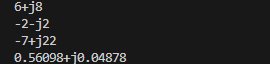
- 복소수 클래스 정의:
complex클래스는 복소수의 실수부(re)와 허수부(im)를 표현.- 덧셈, 뺄셈, 곱셈, 나눗셈 연산을 오버로딩하여 복소수 연산을 수행.
- 중요 함수:
getMag(): 복소수의 크기 계산.getAngle(): 복소수의 각도(라디안) 계산.convert2Cart(): 극좌표(크기, 각도)를 직교좌표(실수, 허수)로 변환.
- 메인 함수:
- 복소수 객체를 생성하고, 연산(
+,,,/)을 수행한 후 결과를 출력
- 복소수 객체를 생성하고, 연산(
3.6.4 예제코드: 복소수 연산 (friend이용)
#include <iostream>
#include <cmath>

using namespace std;

#define PI (4.0 * atan(1.0))

class complex {
    float re;
    float im;

public:
    complex(float re = 0, float im = 0) : re(re), im(im) {}

    // friend 연산자 오버로딩
    friend complex operator+(const complex& c1, const complex& c2);
    friend complex operator-(const complex& c1, const complex& c2);
    friend complex operator*(const complex& c1, const complex& c2);
    friend complex operator/(const complex& c1, const complex& c2);

    void show() {
        cout.precision(5);
        if (im >= 0)
            cout << re << "+j" << im << endl;
        else
            cout << re << "-j" << -im << endl;
    }

    double getMag() const {
        return sqrt(re * re + im * im);
    }

    double getAngle() const {
        if (re == 0 && im == 0)
            return 0.0;
        else
            return atan2(im, re);
    }

    complex convert2Cart(double mag, double ang) const {
        return complex(mag * cos(ang), mag * sin(ang));
    }
};

// friend 함수로 연산자 오버로딩 구현
complex operator+(const complex& c1, const complex& c2) {
    return complex(c1.re + c2.re, c1.im + c2.im);
}

complex operator-(const complex& c1, const complex& c2) {
    return complex(c1.re - c2.re, c1.im - c2.im);
}

complex operator*(const complex& c1, const complex& c2) {
    double mag = c1.getMag() * c2.getMag();
    double angle = c1.getAngle() + c2.getAngle();
    return c1.convert2Cart(mag, angle);
}

complex operator/(const complex& c1, const complex& c2) {
    double mag = c1.getMag() / c2.getMag();
    double angle = c1.getAngle() - c2.getAngle();
    return c1.convert2Cart(mag, angle);
}

int main() {
    complex a(2, 3), b(4, 5), c, d, e, f;
    c = a + b;
    d = a - b;
    e = a * b;
    f = a / b;
    c.show();
    d.show();
    e.show();
    f.show();

    return 0;
}
friend 함수는 클래스의 멤버 함수가 아니므로, 두 피연산자 모두 매개변수로 전달받아 처리할 수 있다. 따라서 왼쪽 피연산자가 반드시 클래스 객체일 필요가 없어진다.
- 멤버함수로 구현한 경우
// + 연산자 오버로딩 (멤버 함수)
    complex operator+(complex input) {
        return complex(this->re + input.re, this->im + input.im);
    }


    int main() {
    complex a(2, 3), b(4, 5);
    complex c = a + b; // a.operator+(b)로 처리됨 (왼쪽은 반드시 complex 객체여야 함)
    c.show();

    // complex 객체가 아닌 값 + complex는 불가능
    // complex d = 1 + a; // 오류 발생: '1'은 complex 객체가 아님

    return 0;
}
- friend함수로 구현한 경우
// friend로 + 연산자 오버로딩
    friend complex operator+(const complex& c1, const complex& c2);

int main() {
    complex a(2, 3), b(4, 5);

    // 정상 작동: 왼쪽과 오른쪽 모두 complex 객체
    complex c = a + b; // operator+(a, b)로 호출됨
    c.show();

    // 새로운 사용법: 왼쪽 피연산자가 클래스 객체가 아닌 경우
    complex d = operator+(1, a); // 허용됨 (operator+(1, a) 호출)
    d.show();

    return 0;
}
실습
#include <iostream>
#include <cstring>
using namespace std;

class Book {
    char* title; // 제목 문자열
    int price;   // 가격

public:
    // 생성자
    Book(const char* title, int price);

    // 복사 생성자
    Book(const Book& obj);

    // 소멸자
    ~Book();

    // 연산자 오버로딩
    void operator+=(int value) {
        this->price = price + value;
    }

    void operator-=(int value) {
        this->price = price - value; // 수정: 뺄셈 연산
    }

    // 제목과 가격 설정
    void set(const char* title, int price);

    // 정보 출력
    void show() {
        cout << title << " " << price << " USD" << endl;
    }
};

// 생성자 구현
Book::Book(const char* title, int price) {
    int length = strlen(title);
    this->title = new char[length + 1];
    this->price = price;
    strcpy(this->title, title);
}

// 복사 생성자 구현
Book::Book(const Book& obj) {
    this->price = obj.price;
    int length = strlen(obj.title);
    this->title = new char[length + 1];
    strcpy(this->title, obj.title);
}

// 소멸자 구현
Book::~Book() {
    delete[] this->title;
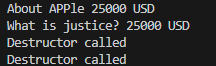
    cout << "Destructor called" << endl; // 소멸자 출력 메시지를 영어로 변경
}

// 제목과 가격 설정 함수
void Book::set(const char* title, int price) {
    if (this->title != nullptr) { // 기존 메모리 해제
        delete[] this->title;
    }
    int length = strlen(title);
    this->title = new char[length + 1];
    strcpy(this->title, title);
    this->price = price;
}
int main() {
    Book a("About APPle", 20000);           // 생성자 호출
    Book b("What is justice?", 30000);     // 생성자 호출

    a += 5000; // a.operator+=(5000)
    b -= 5000; // b.operator-=(5000)

    a.show(); // 출력: About APPle 25000 USD
    b.show(); // 출력: What is justice? 25000 USD

    return 0; // 프로그램 종료
}
3개의 == 연산자 함수를 가진 Book 클래스를 작성하라.
3개의 == 연산자를 friend 함수로 작성하라.
// 실습 9-3 -> operator와 friend의 사용
class Book5
{
    char *title; // 제목 문자열
    int price;   // 가격
public:
    Book5(char *title, int price); // 일반 생성자
    Book5(Book5 &obj);             // 복사 생성자
    ~Book5();
    void operator+=(int value) { this->price += value; }
    void operator-=(int value) { this->price -= value; }
    bool operator!()
    {
        if (this->price == 0)
            return false;
        else
            return true;
    }
    void set(char *title, int price);
    void show() { cout << title << ' ' << price << "원" << endl; }

    // == 연산자를 friend 함수로 선언
    friend bool operator==(const Book5 &book, int price);
};

// 외부에서 정의된 == 연산자
bool operator==(const Book5 &book, int price)
{
    return book.price == price;
}

Book5::Book5(char *title, int price)
{
    // 클래스 멤버 변수와 함수 내 지역변수라서 구분을 this 포인터 사용
    int length = strlen(title);
    this->title = new char[length + 1];
    this->price = price;
    strcpy(this->title, title);
}

Book5::Book5(Book5 &obj)
{
    this->price = obj.price;
    int length = strlen(obj.title);
    this->title = new char[length + 1];
    strcpy(this->title, obj.title);
}

Book5::~Book5()
{
    delete[] this->title;
    cout << "소멸자" << endl;
}

void Book5::set(char *title, int price)
{
    delete[] this->title;
    int length = strlen(title);
    this->title = new char[length + 1];
    strcpy(this->title, title);
    this->price = price;
}

int ex1107_4()
{
    Book5 a((char *)"About Apple", 20000), b((char *)"What is justice?", 30000);

    if (a == 30000) // friend operator== 호출
        cout << "정가 30000원" << endl;
    else
        cout << "30000원 아니다" << endl;

    return 0;
}
댓글남기기