OpenCV 평균필터
- 중심 픽셀(P) 밝기값과, 주변의 8개 픽셀 밝값의 평균값을 출력한다.
총 9개 / 9
(이를 3X3마스크라고 부른다.)
필터 = 커널 = 마스크 = 윈도우 모두 같은 용어이다.
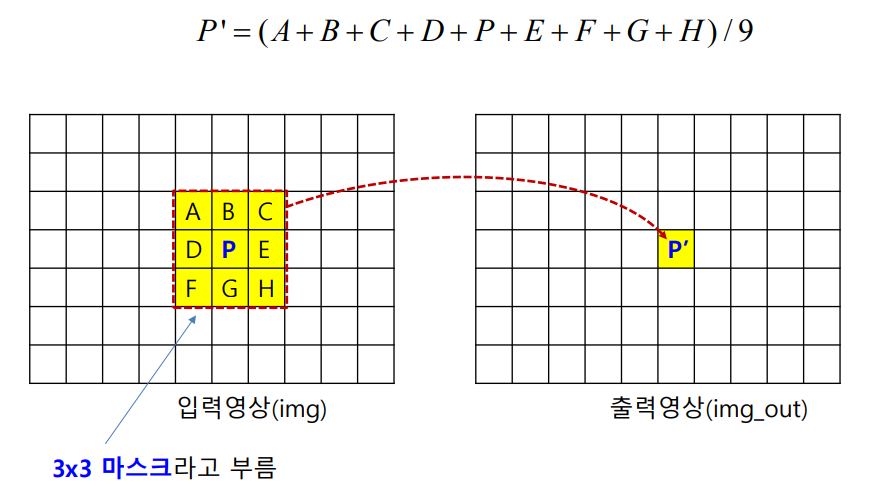
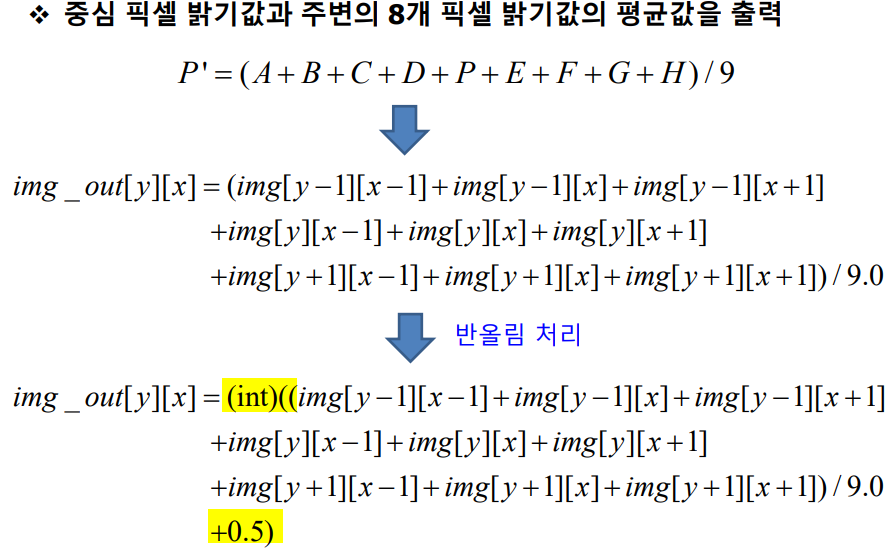
// 현재 픽셀 P와 주변 픽셀들의 관계를 나타내는 배열 요소
P' ≡ img_out[y][x]  // 결과 이미지의 현재 픽셀 위치

// 주변 픽셀 값들
A ≡ img[y-1][x-1];  // 왼쪽 위 픽셀
B ≡ img[y-1][x];    // 위쪽 픽셀
C ≡ img[y-1][x+1];  // 오른쪽 위 픽셀

D ≡ img[y][x-1];    // 왼쪽 픽셀
P ≡ img[y][x];      // 현재 픽셀
E ≡ img[y][x+1];    // 오른쪽 픽셀

F ≡ img[y+1][x-1];  // 왼쪽 아래 픽셀
G ≡ img[y+1][x];    // 아래쪽 픽셀
H ≡ img[y+1][x+1];  // 오른쪽 아래 픽셀
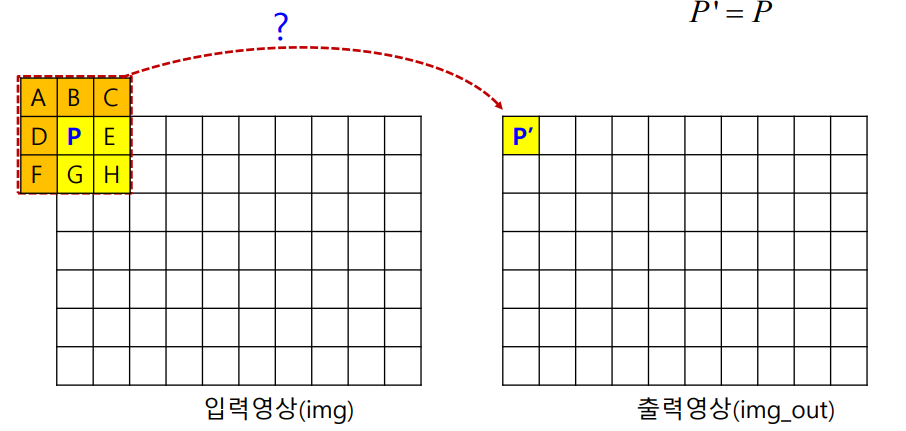
다음과 같이 3x3 마스크내에 유효하지 않은 픽셀이 존재하는 경우
▪ 영상의 가장자리의 경우
▪ 아래 그림의 경우, A, B, C, D, F에 픽셀값이 없음 → 단순 복사
평균필터 해보기
마스크가 가장자리인지 아닌지에 따라 다른 처리를 한다.

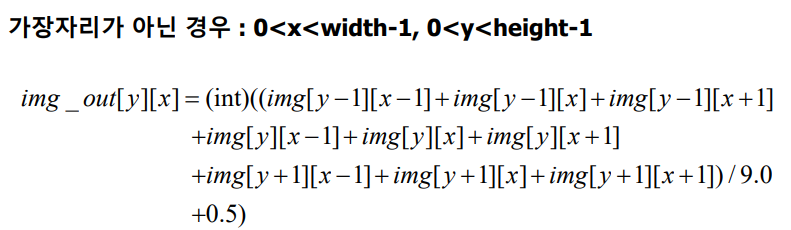
가장자리를 고려하지 않은 코드
int main(void)
{
	int height, width;

	// 이미지 읽어오기
	int** img = ReadImage((char*)"./images/lena.png", &height, &width);
	int** img_out = (int**)IntAlloc2(height, width);

	int y=0, x=200;

	for (y = 1; y < height - 1; y++) {
		for (x = 1; x < width - 1; x++) {

			img_out[y][x] = (img[y - 1][x - 1] + img[y - 1][x] + img[y - 1][x + 1]
				+ img[y][x - 1] + img[y][x] + img[y][x + 1]
				+ img[y + 1][x - 1] + img[y + 1][x] + img[y + 1][x + 1]) / 9.0 + 0.5;

		}

	}

	ImageShow((char*)"input", img, height, width);
	ImageShow((char*)"output", img_out, height, width);
}
for문을 이용하여, y=0일때 width전까지 실행
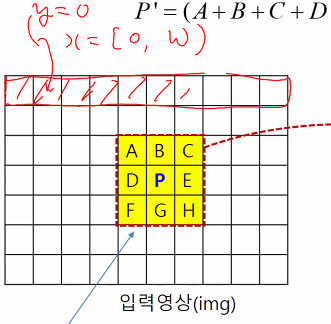
평균을 취하니 아웃풋인 평균이 좀 흐려진다.
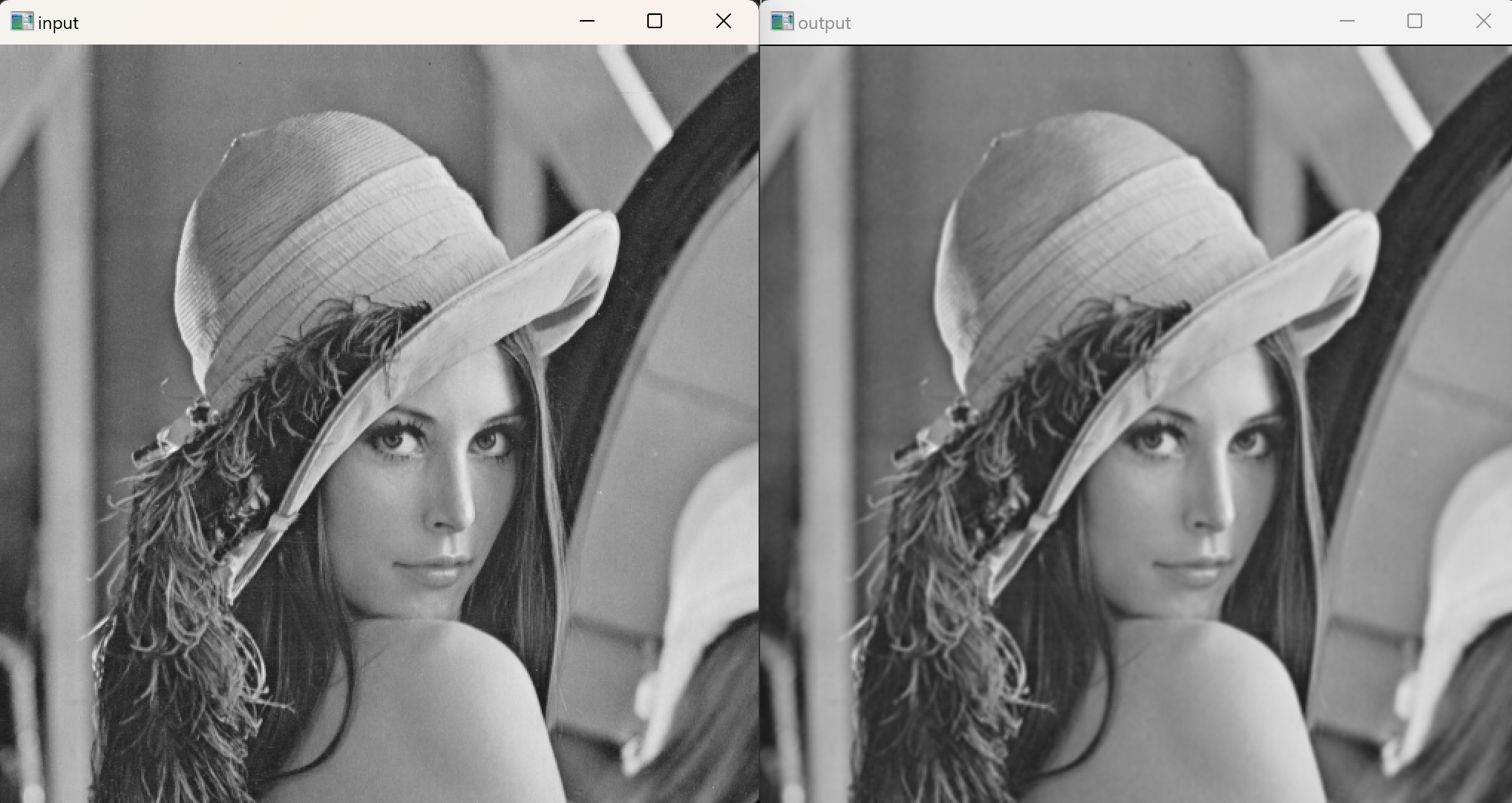
문제점 : 테두리가 검멓다.
가장자리를 고려안했기 때문이다.

마스크가 3x3인 경우
int main(void)
{
	int height, width;

	// 이미지 읽어오기
	int** img = ReadImage((char*)"./images/lena.png", &height, &width);
	int** img_out = (int**)IntAlloc2(height, width);

	int y = 0, x = 0;

		for (y = 1; y < height - 1; y++) {
			for (x = 1; x < width - 1; x++) {

				img_out[y][x] = (img[y - 1][x - 1] + img[y - 1][x] + img[y - 1][x + 1]
					+ img[y][x - 1] + img[y][x] + img[y][x + 1]
					+ img[y + 1][x - 1] + img[y + 1][x] + img[y + 1][x + 1]) / 9.0 + 0.5;

			}

		}


		//위에 가로줄
		y = 0;
		for (x = 0; x < width; x++) {
			img_out[y][x] = img[y][x];
		}

		//아래 가로줄
		y = height - 1;
		for (x = 0; x < width; x++) {
			img_out[y][x] = img[y][x];
		}

		//왼쪽 세로줄
		x = 0;
		for (y = 0; y < height; y++) {
			img_out[y][x] = img[y][x];
		}

		//오른쪽 세로줄
		x = width - 1;
		for (y = 0; y < height; y++) {
			img_out[y][x] = img[y][x];
		}

	ImageShow((char*)"input", img, height, width);
	ImageShow((char*)"output", img_out, height, width);
}
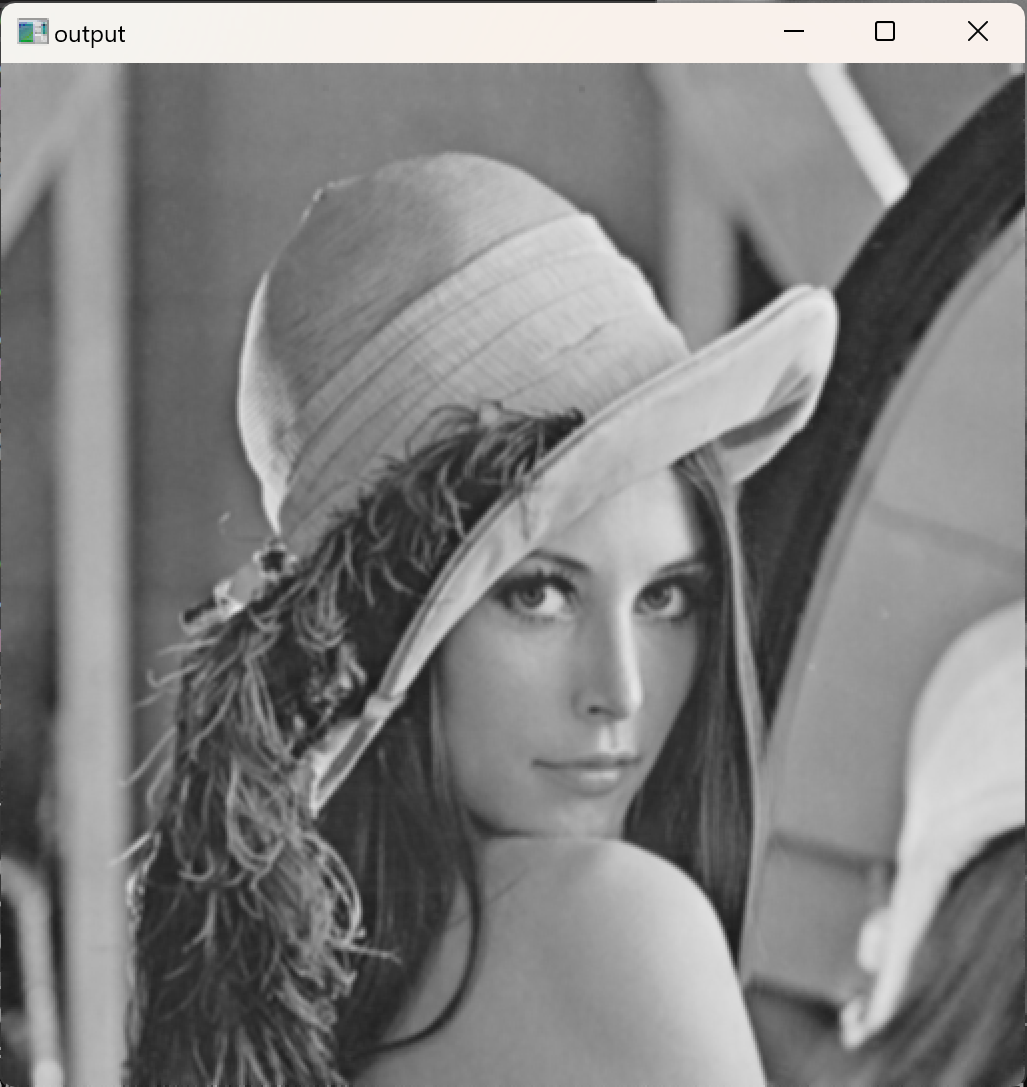
이제 테두리가 없어졌음을 확인할 수 있다.
- 함수화를 해본다.
void MeanFilter( int height,int width, int** img, int** img_out) {
	int y, x;

	for (y = 1; y < height - 1; y++) {
		for (x = 1; x < width - 1; x++) {

			img_out[y][x] = (img[y - 1][x - 1] + img[y - 1][x] + img[y - 1][x + 1]
				+ img[y][x - 1] + img[y][x] + img[y][x + 1]
				+ img[y + 1][x - 1] + img[y + 1][x] + img[y + 1][x + 1]) / 9.0 + 0.5;

		}

	}

	//위에 가로줄
	y = 0;
	for (x = 0; x < width; x++) {
		img_out[y][x] = img[y][x];
	}

	//아래 가로줄
	y = height - 1;
	for (x = 0; x < width; x++) {
		img_out[y][x] = img[y][x];
	}

	//왼쪽 세로줄
	x = 0;
	for (y = 0; y < height; y++) {
		img_out[y][x] = img[y][x];
	}

	//오른쪽 세로줄
	x = width - 1;
	for (y = 0; y < height; y++) {
		img_out[y][x] = img[y][x];
	}

}

int main(void)
{
	int height, width;

	// 이미지 읽어오기
	int** img = ReadImage((char*)"./images/lena.png", &height, &width);
	int** img_out = (int**)IntAlloc2(height, width);


	MeanFilter(height, width, img, img_out);

	ImageShow((char*)"input", img, height, width);
	ImageShow((char*)"output", img_out, height, width);
}
NxN
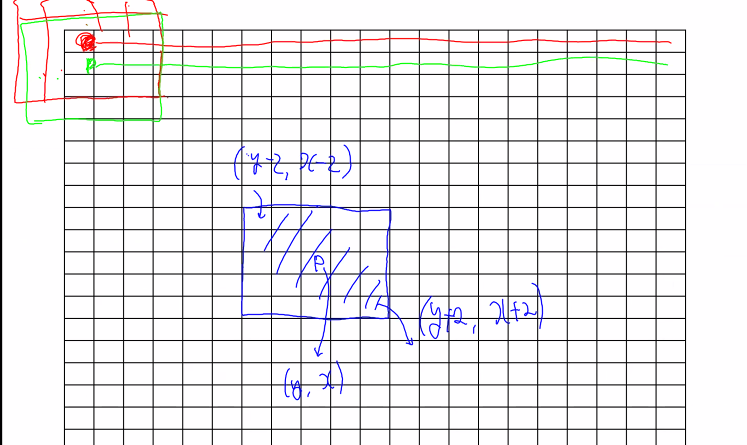
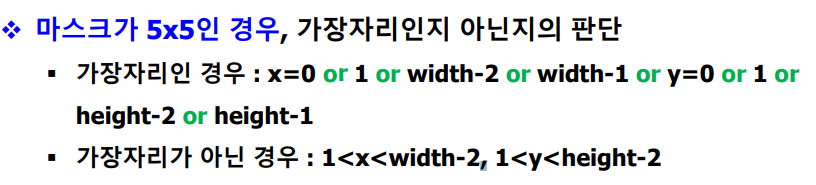
1) 만약에 5x5일때
위의 두줄 안된다. → 주위에 25 픽셀이 존재하지 않는다.
void MeanFilter(int height, int width, int** img, int** img_out) {
	int y, x;

	// 중앙 부분 필터링
	for (y = 1; y < height - 1; y++) {
		for (x = 1; x < width - 1; x++) {
			// 3x3 주변 픽셀 평균 계산
			img_out[y][x] = (img[y - 1][x - 1] + img[y - 1][x] + img[y - 1][x + 1]
				+ img[y][x - 1] + img[y][x] + img[y][x + 1]
				+ img[y + 1][x - 1] + img[y + 1][x] + img[y + 1][x + 1]) / 9.0 + 0.5;
		}
	}

	// 위쪽 가장자리
	y = 0;
	for (x = 0; x < width; x++) {
		img_out[y][x] = img[y][x];  // 원본 값 복사
	}

	// 아래쪽 가장자리
	y = height - 1;
	for (x = 0; x < width; x++) {
		img_out[y][x] = img[y][x];  // 원본 값 복사
	}

	// 왼쪽 가장자리
	x = 0;
	for (y = 0; y < height; y++) {  // 여기에 height를 사용해야 함
		img_out[y][x] = img[y][x];  // 원본 값 복사
	}

	// 오른쪽 가장자리
	x = width - 1;
	for (y = 0; y < height; y++) {  // 여기에 height를 사용해야 함
		img_out[y][x] = img[y][x];  // 원본 값 복사
	}
}

int main(void) {
	int height, width;

	// 이미지 읽어오기
	int** img = ReadImage((char*)"./images/lena.png", &height, &width);
	int** img_out = (int**)IntAlloc2(height, width);

	// 평균 필터 적용
	MeanFilter(height, width, img, img_out);

	// 원본 및 결과 이미지 출력
	ImageShow((char*)"input", img, height, width);
	ImageShow((char*)"output", img_out, height, width);
}
반복문으로 간략화
// 5x5 필터에 사용할 평균값을 계산하는 함수
int getMean5x5(int y, int x, int** img) {
    int sum = 0;

    // 5x5 주변 픽셀의 합계 계산
    for (int i = -2; i <= 2; i++) {
        for (int j = -2; j <= 2; j++) {
            sum += img[y + i][x + j];  // 주변 픽셀 더하기
        }
    }

    // 25개 값의 평균 계산 (5x5)
    int avg = sum / 25.0 + 0.5;  // 평균 계산 후 반올림

    return avg;
}

// 5x5 평균 필터 적용 함수
void MeanFilter5x5_(int height, int width, int** img, int** img_out) {
    int y, x;

    // 이미지의 중앙 부분에 5x5 필터 적용
    for (y = 2; y < height - 2; y++) {
        for (x = 2; x < width - 2; x++) {
            img_out[y][x] = getMean5x5(y, x, img);  // 5x5 필터 평균값 계산
        }
    }

    // 위쪽 2줄 복사
    for (y = 0; y <= 1; y++) {
        for (x = 0; x < width; x++) {
            img_out[y][x] = img[y][x];
        }
    }

    // 아래쪽 2줄 복사
    for (y = height - 2; y < height; y++) {
        for (x = 0; x < width; x++) {
            img_out[y][x] = img[y][x];
        }
    }

    // 왼쪽 2줄 복사
    for (x = 0; x <= 1; x++) {
        for (y = 0; y < height; y++) {
            img_out[y][x] = img[y][x];
        }
    }

    // 오른쪽 2줄 복사
    for (x = width - 2; x < width; x++) {
        for (y = 0; y < height; y++) {
            img_out[y][x] = img[y][x];
        }
    }
}

int main(void) {
    int height, width;

    // 이미지 읽어오기
    int** img = ReadImage((char*)"./images/lena.png", &height, &width);
    int** img_out = (int**)IntAlloc2(height, width);

    // 5x5 평균 필터 적용
    MeanFilter5x5_(height, width, img, img_out);

    // 원본 및 결과 이미지 출력
    ImageShow((char*)"input", img, height, width);
    ImageShow((char*)"output", img_out, height, width);
}
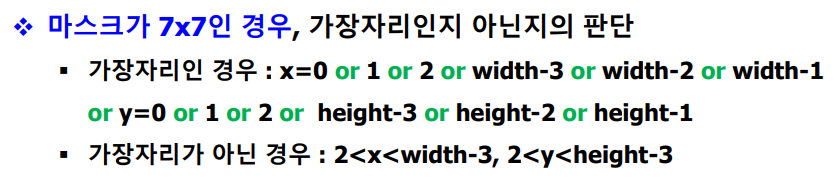
2) 7x7까지 해보기
int getMean7x7(int y, int x, int** img) {

	/*int avg= (img[y - 1][x - 1] + img[y - 1][x] + img[y - 1][x + 1]
	+ img[y][x - 1] + img[y][x] + img[y][x + 1]
	+ img[y + 1][x - 1] + img[y + 1][x] + img[y + 1][x + 1]) / 9.0 + 0.5;*/

	int sum;
	for (int i = -1; i <= 1; i++) {
		for (int j = -1; j <= 1; j++) {

			sum = img[y + i][x + j];
		}

	}

	int avg = sum / 49.0 + 0.5;

	return avg;

}

int getMean7x7(int y, int x, int** img) {
    int sum = 0;

    // 7x7 주변 픽셀의 합계 계산
    for (int i = -3; i <= 3; i++) {
        for (int j = -3; j <= 3; j++) {
            sum += img[y + i][x + j];  // 주변 픽셀 더하기
        }
    }

    // 49개 값의 평균 계산 (7x7)
    int avg = sum / 49.0 + 0.5;  // 평균 계산 후 반올림
    return avg;
}

void MeanFilter7x7(int height, int width, int** img, int** img_out) {
    int y, x;

    // 중앙 부분 필터링
    for (y = 3; y < height - 3; y++) {
        for (x = 3; x < width - 3; x++) {
            img_out[y][x] = getMean7x7(y, x, img);  // 7x7 필터 적용
        }
    }

    // 위쪽 가로줄 복사
    for (y = 0; y <= 2; y++) {
        for (x = 0; x < width; x++) {
            img_out[y][x] = img[y][x];
        }
    }

    // 아래쪽 가로줄 복사
    for (y = height - 3; y < height; y++) {
        for (x = 0; x < width; x++) {
            img_out[y][x] = img[y][x];
        }
    }

    // 왼쪽 세로줄 복사
    for (x = 0; x <= 2; x++) {
        for (y = 0; y < height; y++) {
            img_out[y][x] = img[y][x];
        }
    }

    // 오른쪽 세로줄 복사
    for (x = width - 3; x < width; x++) {
        for (y = 0; y < height; y++) {
            img_out[y][x] = img[y][x];
        }
    }
}

int main(void)
{
	int height, width;

	// 이미지 읽어오기
	int** img = ReadImage((char*)"./images/lena.png", &height, &width);
	int** img_out3x3 = (int**)IntAlloc2(height, width);
	int** img_out5x5 = (int**)IntAlloc2(height, width);
	int** img_out7x7 = (int**)IntAlloc2(height, width);


	//MeanFilter(height, width, img, img_out);
	MeanFilter3x3(height, width, img, img_out3x3);
	MeanFilter5x5_(height, width, img, img_out5x5);
	MeanFilter7x7(height, width, img, img_out5x5);

	ImageShow((char*)"input", img, height, width);
	ImageShow((char*)"output", img_out3x3, height, width);
	ImageShow((char*)"output", img_out5x5, height, width);
	ImageShow((char*)"output", img_out7x7, height, width);

}
- 가장자리 폭 공식 (N-1)/2
3) NxN 참고로 N이 짝수면 안된다.
int getMeanNxN(int N, int y, int x, int** img) {
    int delta = (N - 1) / 2;
    int sum = 0;

    for (int i = -delta; i <= delta; i++) {
        for (int j = -delta; j <= delta; j++) {
            sum += img[y + i][x + j];
        }
    }

    int avg = (int)((sum / (float)(N * N)) + 0.5);
    return avg;
}

void MeanFilterNxN(int N, int height, int width, int** img, int** img_out) {
    int delta = (N - 1) / 2;

    for (int y = delta; y < height - delta; y++) {
        for (int x = delta; x < width - delta; x++) {
            img_out[y][x] = getMeanNxN(N, y, x, img);
        }
    }

    // 위에 가로줄
    for (int y = 0; y < delta; y++) {
        for (int x = 0; x < width; x++) {
            img_out[y][x] = img[y][x];
        }
    }

    // 아래 가로줄
    for (int y = height - 1; y >= height - delta; y--) {
        for (int x = 0; x < width; x++) {
            img_out[y][x] = img[y][x];
        }
    }

    // 왼쪽 세로줄
    for (int x = 0; x < delta; x++) {
        for (int y = 0; y < height; y++) {
            img_out[y][x] = img[y][x];
        }
    }

    // 오른쪽 세로줄
    for (int x = width - 1; x >= width - delta; x--) {
        for (int y = 0; y < height; y++) {
            img_out[y][x] = img[y][x];
        }
    }
}
가장자리 처리는 스킵
NxN함수일때
// NxN 필터에 사용할 평균값을 계산하는 함수
int getMeanNxN(int N, int y, int x, int** img) {
    int delta = (N - 1) / 2;
    int sum = 0;

    // NxN 주변 픽셀의 합계 계산
    for (int i = -delta; i <= delta; i++) {
        for (int j = -delta; j <= delta; j++) {
            sum += img[y + i][x + j];  // 주변 픽셀 더하기
        }
    }

    // NxN 값의 평균 계산
    int avg = sum / (N * N) + 0.5;  // 평균 계산 후 반올림
    return avg;
}

void MeanFilterNxN(int N, int height, int width, int** img, int** img_out) {
    int delta = (N - 1) / 2;
    int y, x;

    // 중앙 부분 필터링
    for (y = delta; y < height - delta; y++) {
        for (x = delta; x < width - delta; x++) {
            img_out[y][x] = getMeanNxN(N, y, x, img);  // NxN 필터 적용
        }
    }

    // 위쪽 가로줄 복사
    for (y = 0; y < delta; y++) {
        for (x = 0; x < width; x++) {
            img_out[y][x] = img[y][x];
        }
    }

    // 아래쪽 가로줄 복사
    for (y = height - delta; y < height; y++) {
        for (x = 0; x < width; x++) {
            img_out[y][x] = img[y][x];
        }
    }

    // 왼쪽 세로줄 복사
    for (x = 0; x < delta; x++) {
        for (y = 0; y < height; y++) {
            img_out[y][x] = img[y][x];
        }
    }

    // 오른쪽 세로줄 복사
    for (x = width - delta; x < width; x++) {
        for (y = 0; y < height; y++) {
            img_out[y][x] = img[y][x];
        }
    }
}

int ex1016_2(void) {
    int height, width;

    // 이미지 읽어오기
    int** img = ReadImage((char*)"./images/lena.png", &height, &width);
    int** img_out = (int**)IntAlloc2(height, width);

    ImageShow((char*)"input", img, height, width);

    // NxN 필터 적용 (N = 3, 5, 7, ..., 13)
    for (int N = 3; N < 15; N += 2) {
        MeanFilterNxN(N, height, width, img, img_out);  // NxN 평균 필터 적용

        // 출력 창 이름을 N 값에 따라 다르게 설정
        char window_name[50];
        sprintf(window_name, "output_N=%d", N);  // 창 이름 지정
        ImageShow(window_name, img_out, height, width);
    }

    return 0;
}
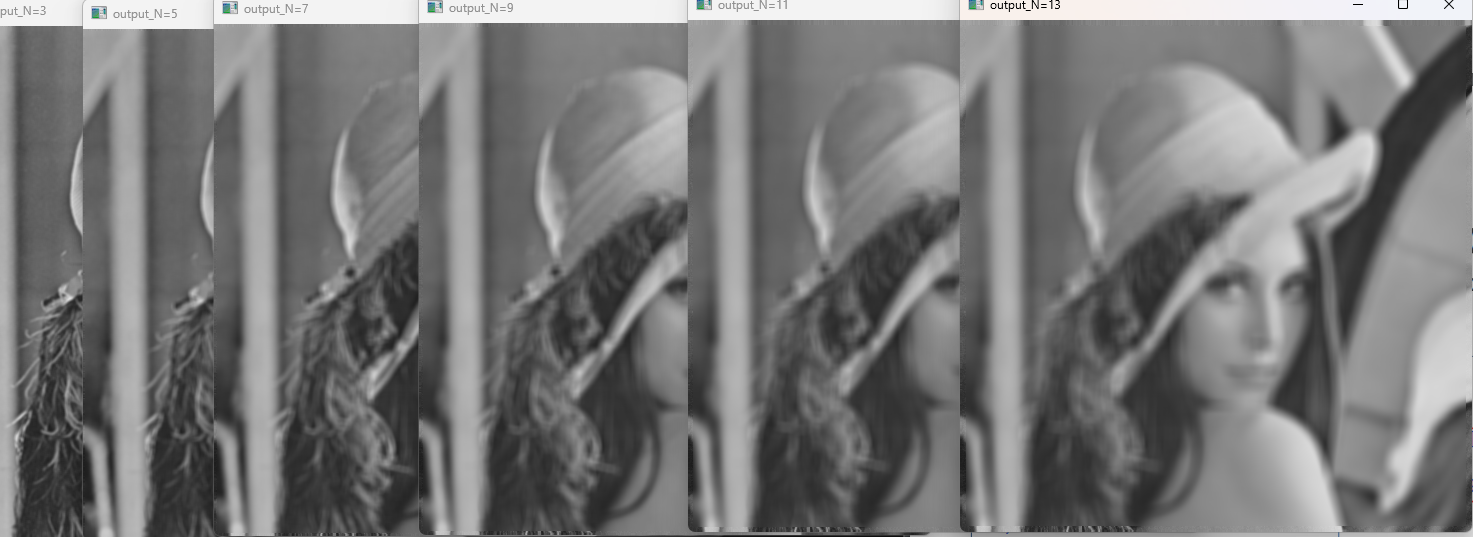
점점 흐려짐을 확인할수 있다.
NxN 커널: 커널 크기가 커질수록 더 많은 픽셀 값을 평균 내게 된다. 이때, 고주파 정보(즉, 이미지의 경계, 선명한 부분, 세부적인 부분)는 저주파 정보(즉, 부드러운 그라디언트 부분)로 평균화되면서 경계가 흐려지고, 세부적인 정보가 사라지게 된다.
여기 평균필터에 대한 페이지의 넘버링된 구조입니다:
- 평균필터
- 중심 픽셀과 주변 8개 픽셀 밝기값의 평균을 출력
- 필터 = 커널 = 마스크 = 윈도우
1.1 평균필터 해보기
- 마스크가 가장자리인지 아닌지에 따라 다른 처리
1.2 NxN
1.2.1 5x5일때
1.2.2 7x7까지 해보기
1.2.3 NxN (N이 짝수면 안됨)
각 섹션은 상세한 코드 예제와 설명을 포함하고 있습니다.
댓글남기기